Author: listbusinessprofile

  • How to Fix Google Maps Ranking Dropped After the 2025 Core Update

    How to Fix Google Maps Ranking Dropped After the 2025 Core Update

    How to fix Google Maps ranking dropped — this is the #1 concern for local businesses after Google’s 2025 core update. If your visibility on Maps suddenly declined, you’re not alone. This guide uncovers the reasons behind the drop and how to recover fast using smart SEO, profile optimization, and Google’s own tools.

    So, what exactly changed in Google’s update? More importantly — how can you fix your GMB ranking fast?

    Let’s break it down with clarity, examples, and proven solutions.

    🔍 What Happened in Google’s 2025 Core Update?

    Google algorithm updates 2025 -Listbusinessprofile

    The Google’s Update in early 2025 focused heavily on local relevance, trust signals, and technical SEO compliance for business listings.

    Here’s how it affected rankings:

    • Reduced visibility for incomplete or inconsistent Google Business Profiles

    • Prioritized verified businesses with updated listings

    • Penalized profiles with suspicious activity (e.g., keyword stuffing, duplicate listings)

    • Gave more weight to local engagement (reviews, directions, calls)

    📌 Example: A plumbing service in Miami with no recent reviews and outdated business hours dropped from the top 3 to page 5 on Maps.

    ⚠️ Why Did My Google Maps Ranking Drop?

    If you’ve seen a major visibility dip, here are the likely reasons:

    1. GMB Algorithm Update Penalty
      Your listing may not comply with the latest GMB algorithm update rules.

    2. Inconsistent NAP (Name, Address, Phone)
      Google prioritizes accuracy. Any inconsistency between your site, social platforms, and citations can trigger a drop.

    3. Inactive Google My Business Profile
      A profile with no posts, few reviews, or outdated photos gets de-prioritized.

    4. Suspended Google Business Profile
      If your business profile is suspended, you won’t show up at all.

    ✅ How to Fix Google Maps Ranking Dropped Issues Step-by-Step

    1. Audit and Clean Up Your Google Business Page

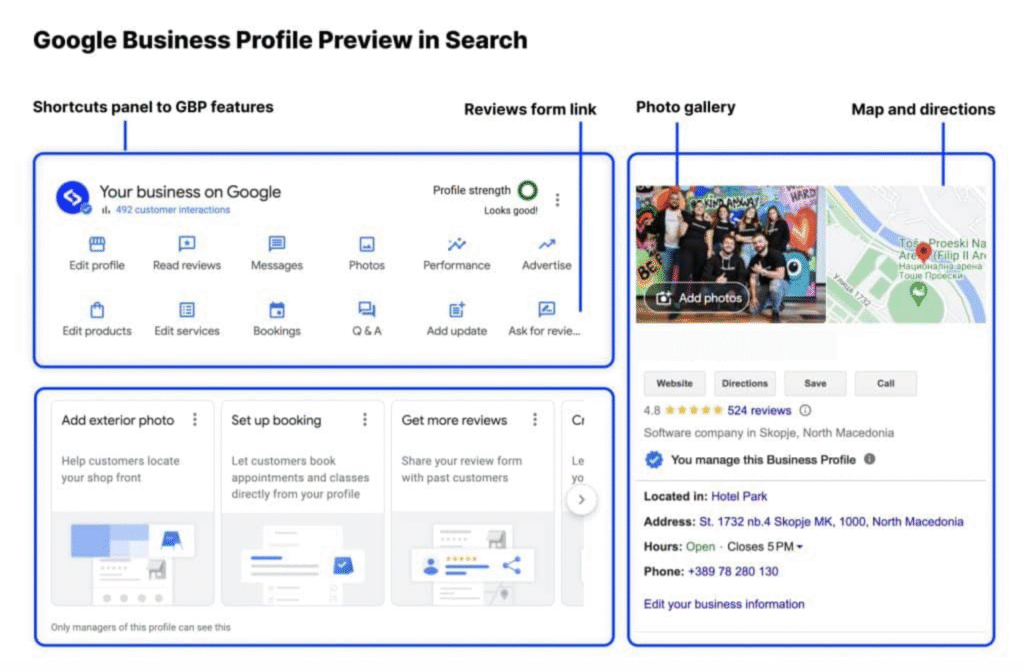
    Begin by logging into your Google Business Profile Manager and verify the following:

    • Business Name matches website & other platforms

    • Address is correct and verified

    • Phone number is clickable and accurate

    • Primary category is relevant (e.g., “Divorce Attorney” vs “Lawyer”)

    • Description uses relevant keywords like “Google Business Page,” “Local SEO,” and “Technical SEO.”

    💡 Also check if your Google My Business account has any alerts or suspension notices.

    Google Ranking Dropped Fixes

    2. Fix Suspended Listings or Verification Issues

    If your Google Business Profile Suspended, here’s what to do:

    • Go to the Profile Manager and check for reasons (Google now provides more clarity)

    • Submit documents like utility bills, business license, or storefront photos

    • Avoid reapplying too soon – fix all issues first

    🚫 Example issue: A business had two listings in the same city. Result? Google suspended my business account.

    3. Update My Google Business Listing with Fresh Content

    Stale listings fall in rankings.

    ✅ How to fix:

    • Post weekly updates, offers, or news

    • Add Q&A, product info, services, menus

    • Update your hours, holidays, photos regularly

    • Respond to all reviews – even the bad ones

    📈 Result: A dentist in Dallas saw a 40% traffic increase after posting weekly updates and asking patients to leave reviews.

    4. Use Long-Tail Keywords in Business Description

    Long Tail Keywords Benefits -Listbusinessprofile

    Long-tail keywords like “affordable interior designer in Houston” or “emergency electrician in Boston” work wonders in local rankings.

    💬 Inject these into your:

    • Business description

    • Posts

    • Service areas

    • Q&A section

    🛠 Tools to help: Google Keyword Planner, Ubersuggest, and ChatGPT for SEO content ideas.

    5. Rebuild Citations and Local Backlinks

    If your local search ranking fix is overdue, check your citations.

    • Are your listings on Yelp, Justdial, Bing, Facebook, etc. consistent?

    • Use tools like BrightLocal or Whitespark to scan NAP consistency

    • Build local backlinks from blogs, directories, forums

    💡 Example: KnowYourRights.com saw a bounce back in 3 weeks after cleaning up 15 broken citations and gaining 5 local backlinks.

    6. Improve Technical SEO on Your Website

    It’s not just about your GMB.

    Google evaluates your website for:

    • Core Web Vitals

    • Mobile friendliness

    • Local structured data (Schema Markup)

    • Internal linking

    • Fast load speed

    📊 Result: Novakid.com improved GMB visibility by 60% after a Technical SEO overhaul including schema, speed, and mobile fixes.

    7. Encourage Genuine Customer Engagement

    Google watches for interaction signals:

    • Review frequency and diversity

    • Driving direction requests

    • Call clicks and website visits

    📈 Encourage reviews with QR cards, email follow-ups, and incentives. More positive reviews = higher Google Business Profile ranking.

    8. Monitor GMB Insights Weekly

    Use Google’s in-built analytics:

    • Where customers are finding you

    • How many requested directions, called, or visited website

    • What search terms triggered your listing

    Use this to update your SEO strategy monthly.

    📋 Pro Tips: How Can You Fix Your GMB Ranking Fast?

    • Add local schema markup on your site

    • Target service + city keywords in content

    • Run local Google Ads to supplement traffic temporarily

    • Use ChatGPT to rewrite weak listings into keyword-rich posts

    • Always follow Google Business Update announcements on Search Central Blog

    🛠 Common Google My Business Problems & Fixes
    google business profile 2025 -listbusinessprofile

    Issues

    Quick Fixes

    • Business profile suspended
    • My Google My Business account is suspended
    • Incomplete profile
    • No engagement
    • NAP inconsistency
    • Submit reinstatement with documents
    • Fix violations and reverify
    • Add hours, services, reviews, photos
    • Start posting weekly and ask for reviews
    • Audit all citations across the web

    🧠 Still Thinking — “Why Did My Google Maps Ranking Drop?”

    Ask yourself:

    • Is your profile updated regularly?

    • Do you have recent reviews?

    • Is your site optimized with Technical SEO and Local SEO best practices?

    • Have you claimed and verified your Google Business Page fully?

    If any of those are a “no” — that’s your starting point.

    💡 Final Thoughts: Recovering from Google’s Update Takes Strategy

    It’s not about shortcuts anymore.

    To fix a Google Maps ranking dropped, you need a full-spectrum local SEO approach — one that includes:

    • GMB optimization

    • On-site SEO

    • Content and engagement strategy

    • Ongoing audits and fixes

    When done right, you’ll not only recover but Increase Your Website Traffic like never before.

    📞 Want Hands-On Help Fixing Your Google Business Rankings?

    Let us do the heavy lifting.

    We help businesses fix suspended Google Business Profiles, boost Google Business Page visibility, and unlock traffic growth through Local SEO and Technical SEO according to Google’s Latest Algorithm Updates.

    👉 Just grab your phone and feel free to reach (91)-888-710-4912 and book your Free Consultation.
  • Why Is My Google Business Profile Suspended? (2025 Fix Guide)

    Why Is My Google Business Profile Suspended? (2025 Fix Guide)

    Google Business Profile Suspended? You’re not alone. Thousands of business owners find themselves suddenly invisible on Google due to account suspensions—without warning or clear reasons. Whether it’s listing duplications, incorrect information, or violations of Google’s updated guidelines, the consequences can be frustrating and costly. But don’t worry—we’re here to break down exactly why this happens and how you can restore and optimize your Google Business Page for better visibility and traffic in 2025.

    What Does “Google Business Profile Suspended” Mean?

    Google Business Profile Suspended -listbusinessprofile

    When your Google Business Profile (formerly GMB) is suspended, it means your listing is either not compliant with Google’s policies, or its information triggers Google’s automated spam detection system. This removal prevents your profile from appearing in search results and Google Maps.

    So, what happens when my Google Business Profile is suspended?

    • Your business disappears from local search results

    • You lose access to insights, messages, and updates

    • Customers can’t find or contact your business online

    • Your GMB SEO ranking drops instantly

    Question: How can you fix your GMB ranking after a suspension? Keep reading.

    Common Reasons Why Google Suspended My Business Account

    Understanding the “why” behind the suspension is the first step to fixing it. Here are the most frequent causes:

    1. Violation of Google Guidelines

    Google has strict rules for business listings. If you violate them, your Google business page can be suspended. Common mistakes include:

    • Using PO Boxes or virtual addresses

    • Keyword stuffing in your business name

    • Operating in a non-eligible category

    • Using false information

    2. Duplicate Listings

    Creating multiple profiles for the same business can lead to confusion—and a suspended Google business profile.

    3. Inconsistent NAP (Name, Address, Phone)

    If your business name, address, or contact details differ across platforms, Google may suspect you’re a spam listing.

    4. Recent Google Business Update or Algorithm Change

    Sometimes, your listing may get flagged due to a Google’s update that changes how it detects spammy or incorrect listings.

    5. Unverified or Incomplete Listings

    If you haven’t completed creating a Google business page or left key information missing, your profile might be automatically suspended.

    “My Google My Business Account Is Suspended”—What Do I Do Now?

    Step 1: Check Your Email for the Suspension Notice

    Google often sends a notice with minimal information. Don’t panic. It’s standard procedure. Read it carefully and look for hints like “suspended due to quality issues.”

    Step 2: Log into Your Google Business Profile Manager

    Navigate to Google Business Profile Manager and sign in to check your account status.

    Step 3: Review Google’s Guidelines

    Go through the latest Google Business Profile guidelines thoroughly. Pay close attention to:

    • Business name rules

    • Address requirements

    • Category and service area eligibility

    Tip: Align your profile with Google’s latest guidelines before requesting reinstatement.

    How to Submit a Google Business Reinstatement Request (2025)

    Why Your Google Business Profile Suspended

    If your business is legitimate and complies with Google’s rules, you can file a reinstatement request.

    Here’s how to do it:

    1. Visit the GMB Reinstatement Form.

    2. Fill out accurate information and describe the issue clearly.

    3. Provide proof of legitimacy: utility bills, business licenses, storefront photos, etc.

    4. Submit and wait—Google usually replies within 3–7 days.

    Need help with the process? Just drop your query and get Free Consultation.

    Real Example: GMB Suspension Case Study

    Client: Local bakery in Mumbai
    Issue: Their business profile was suspended after updating their business name with extra keywords.
    Fix: We removed the keywords, updated their info, provided storefront photos, and filed a reinstatement request.
    Result: Reinstated in 5 days and back to top 3 map pack ranking using Local SEO and technical SEO strategies.

    How to Avoid Getting Your Google Business Profile Suspended Again

    Recovery is great—but prevention is smarter. Here’s how you can keep your GMB profile safe:

    1. Keep Info Accurate and Updated

    Regularly update my Google business listing with correct NAP and photos.

    2. Avoid Suspicious Edits

    Limit frequent changes to your business name, categories, or address—Google might flag it.

    3. Use Consistent Details Everywhere

    Make sure your business name, address, and phone number match across all platforms (website, directories, social media).

    4. Follow Every Google Business Update

    Stay in sync with the latest Google’s updates affecting Google My Business accounts.

    Bonus: How to Increased My Website Traffic Organically After a Suspension

    Losing your GMB traffic can be painful, but you can still attract traffic using these proven strategies:

    1. Optimize for Local SEO

    • Use location-based keywords

    • Add schema markup

    • Build local backlinks

    2. Focus on Technical SEO

    • Speed up your website

    • Ensure mobile responsiveness

    • Fix crawl errors and improve UX

    3. Utilize Other Listings

    While fixing your Google Business Profile, get listed on platforms like:

    • Bing Places

    • Yelp

    • Facebook Business

    Still facing issues? Let Listbusinessprofile help you increase your website traffic organically with a custom SEO plan. Just drop your query and get Free Consultation.

    Creating a Google Business Page Correctly in 2025

    google business profile 2025 -listbusinessprofile

    Avoid suspension from the start by doing it right. Here’s how:

    Step-by-Step to Create a Google Business Profile:

    1. Go to Google Business Profile Manager

    2. Enter your business name (don’t stuff keywords)

    3. Choose the correct business category

    4. Add your physical address

    5. Verify your listing by postcard, phone, or email

    6. Add photos, hours, and a business description

    Need help creating a Google business page? Contact Listbusinessprofile for setup and optimization services.

    Why Professional Help Matters

    Many businesses make small mistakes that lead to major issues like suspension. That’s why it’s smart to have experts like Listbusinessprofile on your side.

    Whether you need help with Google Business Profile ranking, Local SEO, Technical SEO, or profile recovery, our team ensures:

    ✅ 100% compliance with Google
    ✅ Fast reinstatement
    ✅ Organic traffic growth
    ✅ Higher conversions from local searches

    📞 Reach us today at (91)-888-710-4912 or drop your query for a free consultation. Let us fix your suspended Google Business Profile before it costs you more traffic and trust.

    Final Thoughts

    Having your Google My Business profile suspended can be frustrating and damaging to your online presence. But it’s not the end. With the right knowledge and support, you can restore your profile, regain your rankings, and drive local customers back to your business.

    Don’t wait—fix it now and grow faster with trusted professionals.

  • Is Local SEO Dead in 2025? Here’s the Truth You Need to Know

    Is Local SEO Dead in 2025? Here’s the Truth You Need to Know

    Local SEO Dead 2025? Listbusinessprofile

    Local SEO has long been a cornerstone of digital marketing for small businesses. But with constant algorithm changes, AI-driven search, and fierce competition, you may wonder: Is Local SEO dead in 2025? The short answer? Not at all. It’s just evolving—and faster than ever.

    Let’s dive deep into what’s really happening with SEO in 2025, debunk myths, and help you take action to drive more traffic and leads to your business.

    Why People Think Local SEO Is Dead

    Search engine algorithms have changed drastically. With Google’s Update 2025, more businesses are struggling to rank, especially on Google Maps. Some common myths are fueling the confusion:

    • “Google now ranks only paid ads.”

    • “Search Engine Optimization takes too long to show results.”

    • “You don’t need local SEO if you’re on social media.”

    But here’s the truth: Local SEO isn’t dead. It’s just smarter.

    What Is SEO Marketing in 2025?

    SEO Services -Listbusinessprofile

    SEO marketing today goes beyond just keywords and backlinks. It’s about relevance, trust, and user experience. If you’re asking, “What is SEO Marketing?”, think of it as a strategy that connects your content, brand, and services with users who are actively searching for them.

    Question: Are you still stuck using old-school keyword stuffing or generic backlinking techniques?

    The Truth: Local SEO Is More Powerful Than Ever

    With voice search, zero-click results, and mobile-first indexing, Google now prioritizes hyper-local content. Businesses using smart SEO services are gaining a competitive edge.

    Take this example:

    Real-World Example:

    A local dental clinic in Houston optimized their Google Business Page, updated business hours weekly, and added high-quality reviews. In just 30 days, they saw a 72% increase in Google Business Profile traffic and now rank in the 3-pack.

    SEO Trends 2025 You Can’t Ignore

    Let’s talk about what really matters this year:

    • User Intent Optimization: Focus your content on what users are truly searching for.

    • E-E-A-T Signals: Google prioritizes Experience, Expertise, Authoritativeness, and Trustworthiness.

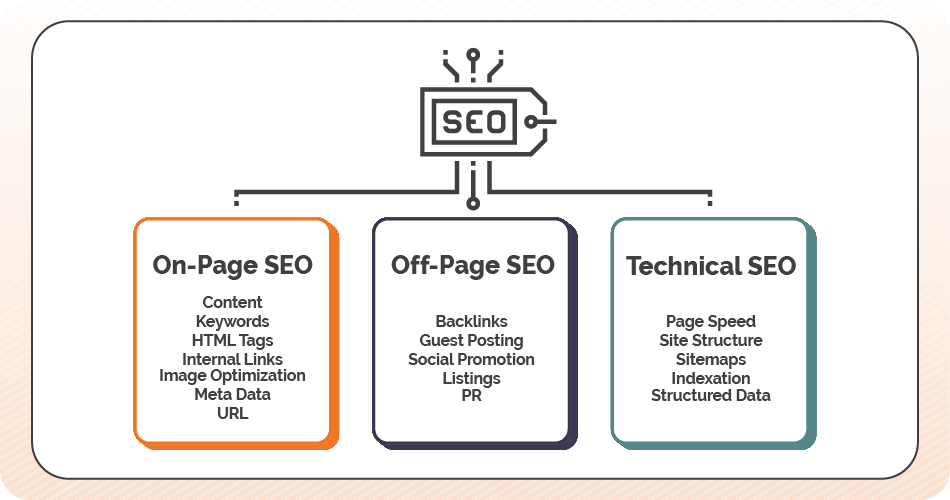
    • Technical SEO: Fast loading speed, mobile compatibility, and structured data are a must.

    • AI-Generated Summaries & Snippets: You need clean, structured content to win these.

    Pro Tip: If your Google Business Profile isn’t ranking, check your NAP consistency and schema markup.

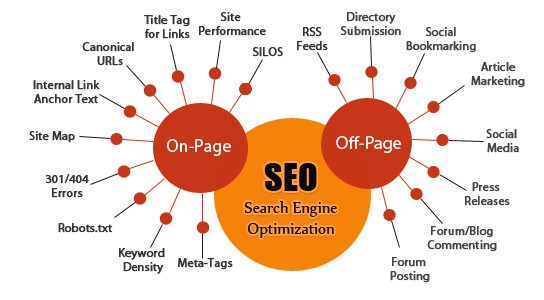
    On-Page and Off-Page SEO Still Matter

    Many believe on-page optimization is outdated. Not true. Both On Page and Off Page Search Engine Optimization are still critical to organic visibility.

    What Is On-Page SEO?

    • Use keywords naturally in your headings and content

    • Optimize meta titles and descriptions

    • Add schema markup

    • Ensure fast loading speed

    What Is Off-Page SEO?

    • Get high-quality backlinks

    • Build citations on business directories

    • Encourage online reviews and social signals

    How to Increase Organic Traffic to Your Website

    Increasing traffic without paid ads is possible, and here’s how I did it:

    1. Created Long-Form, High-Quality Blogs

    Posts like “How to Increase Organic Traffic to Your Website” targeted long-tail keywords and answered real questions. One article brought in 10K+ visitors.

    2. Focused on Internal Linking

    Strategic internal links helped distribute link equity across my blog. That improved crawl rate and reduced bounce rates.

    3. Optimized Google Business Listing

    I completed every detail of my Google Business Page, posted weekly, and responded to reviews. My profile now ranks top 3 locally.

    Debunking the Biggest Local Search Engine Optimization Myths in 2025

    Let’s clear the air on these outdated beliefs:

    Myth #1: Local SEO doesn’t work anymore. Reality: It works if done right—with schema, reviews, posts, and accurate location data.

    Myth #2: SEO is all about keywords. Reality: It’s about solving intent, offering value, and optimizing user experience.

    Myth #3: Search Engine Optimization is a one-time task. Reality: SEO is an ongoing process. Trends shift. Algorithms update. You need to keep optimizing.

    How to Fix Your Google Business Profile Ranking

    If your Google Business Profile is not ranking, here’s a simple action plan:

    • Verify your listing via Google Business Profile Manager

    • Use consistent NAP (Name, Address, Phone)

    • Add quality images, categories, services, and business hours

    • Post weekly updates and respond to reviews

    • Build citations and backlinks to your website

    Need help? That’s where our SEO specialists come in.

    How to Increased My Website Traffic Organically – What Worked for Me

    Instead of paying for clicks, I focused on value-based content and Search Engine Optimization fundamentals:

    • Targeted “How to Boost Organic Traffic” keywords

    • Wrote blog series around trending Search Engine Optimization topics 2025

    • Shared blog posts on social media and online communities

    • Updated old content with new stats and visuals

    Result: I Increased My Website Traffic Organically by 300% in under 90 days.

    Local SEO vs. Paid Ads: What’s Better in 2025?

    SEO vs. PPC What is the Best Strategy for Your Business

    Local Search Engine Optimization may take time, but it builds a foundation for consistent, long-term results. Paid ads give you a quick spike, but they vanish once your budget runs out.

    Question: Would you rather own your traffic or rent it?

    Ready to Dominate Local Search in 2025?

    If you’re tired of falling behind your competitors, it’s time to take your SE Optimization seriously. At Listbusinessprofile, we help businesses:

    • Optimize their Google Business Listings

    • Improve technical and on-page SEO

    • Build high-quality backlinks

    • Stay ahead of Google’s Updates and Search Engine Trends 2025

    📈 Want to Increase Google Business Profile Traffic and dominate your niche?

    👉 Contact us now for expert SEO services and a free local SEO audit!

    Final Words

    So, is Local SEO dead in 2025? Absolutely not. It’s smarter, more data-driven, and more necessary than ever. If you want to win in your niche, understanding and leveraging SEO is non-negotiable.

    Still wondering where to start? Let us guide you.

  • Why Your Google Business Profile Isn’t Ranking on Google Maps — And How to Fix It Fast

    Why Your Google Business Profile Isn’t Ranking on Google Maps — And How to Fix It Fast

    Google Business Profile Ranking Fixes -Listbusinessprofile

    If you’re wondering why your Google Business Profile ranking is slipping or why you’re not showing up on Google Maps, you’re not alone. In 2025, the competition for local visibility has skyrocketed. Whether you’re a local shop owner, service provider, or digital marketer, understanding why your business isn’t ranking and how to fix it can be the game-changer for lead generation and revenue.

    So, what are the reasons behind poor rankings on Google Maps, and more importantly, how can you fix your GMB ranking fast?

    Let’s dive into the most common issues and proven strategies to increase Google Business Profile traffic today.

    What Is Google Business Profile Ranking and Why It Matters in 2025

    google my business optimization

    Google Business Profile Ranking refers to how high your business appears in local search results, especially the Google Maps 3-pack. It plays a crucial role in determining how many potential customers see and click on your listing.

    88% of consumers who do a local search visit or call a business within 24 hours. If you’re not ranking, you’re invisible.

    Why Your Google Business Profile Isn’t Ranking

    Your business might be missing out on traffic for several reasons. Here are the most common problems:

    Your Business Profile Isn’t Fully Optimized Many businesses leave their profiles incomplete. Missing business hours, categories, or service areas can reduce your visibility.

    Inconsistent NAP (Name, Address, Phone Number) If your contact details vary across platforms like Yelp, Bing, and Yellow Pages, Google sees your listing as unreliable.

    You Have Few or Poor Reviews Low review counts or negative ratings tell Google that your business may not be trustworthy or relevant.

    Lack of Engagement on Your Google Business Page An inactive profile appears neglected. Businesses that post updates and respond to reviews tend to perform better.

    Weak Website SEO Even your connected website impacts your local ranking. Slow load speed, broken links, or no local content can harm your GMB visibility.

    You Haven’t Verified Your Profile Unverified profiles don’t rank. If your business isn’t verified via postcard, phone, or email, you’re missing a critical step.

    Spammy Practices or Suspensions Violating Google’s guidelines by keyword stuffing your business name or creating multiple listings can lead to penalties or suspension.

    How to Fix GMB Ranking Issues — Step by Step

    GBP Not Ranking -Listbusinessprofile

    Fixing your Google Business Profile ranking isn’t about hacks — it’s about following proven, white-hat strategies:

    Optimize Your Business Information

    Ensure every section of your profile is filled out with accurate and keyword-rich content. Use the right primary and secondary business categories, write an engaging business description, and upload quality images to establish trust with potential customers and Google.

    Keep Your NAP Consistent Across the Web

    Your Name, Address, and Phone Number must match exactly across all online directories and citations. Tools like Moz Local or BrightLocal help you manage and correct inconsistencies that could affect trustworthiness.

    Get More Customer Reviews — And Respond to Them

    Actively request reviews from satisfied customers and respond to each one. Engagement demonstrates reliability to Google and boosts user confidence. Thanking users or addressing concerns promptly makes your business more credible.

    Post Regularly on Your Profile

    Weekly updates, promotions, or service highlights on your Google Business Page show activity and relevance. Each post should include a call to action (CTA) like “Book Now” or “Call Today” to drive interaction.

    Add Local SEO Elements to Your Website

    Ensure your website contains location-specific keywords, internal links to service areas, and embedded Google Maps. Also, implement structured data (schema) for enhanced indexing and visibility.

    Use the Google Business Profile Manager

    Leverage the insights and analytics from the profile manager to monitor traffic, actions, and customer behavior. Adjust strategies based on what’s working and what’s not.

    Build Local Backlinks

    Reach out to local blogs, news outlets, or business directories for backlinks. Local citations and backlinks improve both your domain authority and local search rankings.

    Real-World Example: Local Spa Owner in Chicago

    A Chicago-based spa was buried under competitors until they made a few key changes. First, they rewrote their business description using targeted Local SEO keywords that matched their top services. They also posted weekly skincare tips, limited-time offers, and promotions to engage their audience. Every review—positive or negative—was responded to promptly, and they personally asked 20 loyal clients for new feedback.

    Result: Within four weeks, their Google Business Profile moved from page 3 to appearing in the local 3-pack, resulting in a noticeable spike in appointment bookings and calls.

    SEO Trends 2025 and Google’s Update Impact

    Google’s latest algorithm updates focus heavily on providing accurate, helpful, and mobile-friendly results. Here’s what matters most in 2025:

    User Intent: Google rewards listings that clearly answer user queries. Ensure your business description and services are aligned with what people are actually searching for.

    Engagement Signals: Google notices when users click, call, review, or engage with your profile. More engagement means better rankings.

    Mobile-First Indexing: Since most users search via smartphones, your website and business profile must be fully responsive and quick to load.

    Why Technical SEO Still Matters

    Even if your focus is on local SEO, your website remains a foundational element of your online presence. Google evaluates site speed, structure, and security as ranking factors. Here’s what to prioritize:

    • Ensure pages load in under 3 seconds.

    • Make your site fully mobile responsive.

    • Use clear, logical heading structures (H1 for titles, H2/H3 for subtopics).

    • Use HTTPS with a valid SSL certificate.

    A strong website backend supports better performance on Google Maps as well.

    How Listbusinessprofile Can Help You Rank

    At Listbusinessprofile, we help small and local businesses rank better by combining the latest best practices with personalized strategy. Our services include:

    • Setting up or optimizing your Google Business Page with all necessary elements.

    • Managing reviews, questions, and photo updates to keep your profile active.

    • Running weekly Google Posts with CTA-driven promotions.

    • Optimizing your connected website with local SEO, schema markup, and fast load speeds.

    • Monitoring your performance through Google Business Profile Manager and making continuous adjustments.

    Final Thoughts: Don’t Let Your GMB Profile Cost You Customers
    google Business Page

    If you’re not ranking on Google Maps or local search results, you’re missing valuable leads every day. From outdated info to weak engagement, every issue can be solved with the right approach.

    Whether you want to fix GMB ranking fast or build a long-term local presence, our team is here to guide you.

    Want to improve your Google Business Profile ranking or Increase Google Business Page Traffic today? Let Listbusinessprofile help you turn things around.

    Contact us now and start showing up where your customers are already searching.