Blog

  • Why Your Google Business Profile Isn’t Ranking on Google Maps — And How to Fix It Fast

    Why Your Google Business Profile Isn’t Ranking on Google Maps — And How to Fix It Fast

    Google Business Profile Ranking Fixes -Listbusinessprofile

    If you’re wondering why your Google Business Profile ranking is slipping or why you’re not showing up on Google Maps, you’re not alone. In 2025, the competition for local visibility has skyrocketed. Whether you’re a local shop owner, service provider, or digital marketer, understanding why your business isn’t ranking and how to fix it can be the game-changer for lead generation and revenue.

    So, what are the reasons behind poor rankings on Google Maps, and more importantly, how can you fix your GMB ranking fast?

    Let’s dive into the most common issues and proven strategies to increase Google Business Profile traffic today.

    What Is Google Business Profile Ranking and Why It Matters in 2025

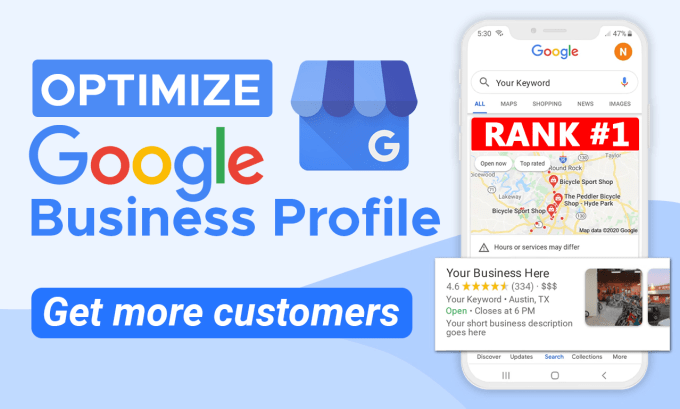
    google my business optimization

    Google Business Profile Ranking refers to how high your business appears in local search results, especially the Google Maps 3-pack. It plays a crucial role in determining how many potential customers see and click on your listing.

    88% of consumers who do a local search visit or call a business within 24 hours. If you’re not ranking, you’re invisible.

    Why Your Google Business Profile Isn’t Ranking

    Your business might be missing out on traffic for several reasons. Here are the most common problems:

    Your Business Profile Isn’t Fully Optimized Many businesses leave their profiles incomplete. Missing business hours, categories, or service areas can reduce your visibility.

    Inconsistent NAP (Name, Address, Phone Number) If your contact details vary across platforms like Yelp, Bing, and Yellow Pages, Google sees your listing as unreliable.

    You Have Few or Poor Reviews Low review counts or negative ratings tell Google that your business may not be trustworthy or relevant.

    Lack of Engagement on Your Google Business Page An inactive profile appears neglected. Businesses that post updates and respond to reviews tend to perform better.

    Weak Website SEO Even your connected website impacts your local ranking. Slow load speed, broken links, or no local content can harm your GMB visibility.

    You Haven’t Verified Your Profile Unverified profiles don’t rank. If your business isn’t verified via postcard, phone, or email, you’re missing a critical step.

    Spammy Practices or Suspensions Violating Google’s guidelines by keyword stuffing your business name or creating multiple listings can lead to penalties or suspension.

    How to Fix GMB Ranking Issues — Step by Step

    GBP Not Ranking -Listbusinessprofile

    Fixing your Google Business Profile ranking isn’t about hacks — it’s about following proven, white-hat strategies:

    Optimize Your Business Information

    Ensure every section of your profile is filled out with accurate and keyword-rich content. Use the right primary and secondary business categories, write an engaging business description, and upload quality images to establish trust with potential customers and Google.

    Keep Your NAP Consistent Across the Web

    Your Name, Address, and Phone Number must match exactly across all online directories and citations. Tools like Moz Local or BrightLocal help you manage and correct inconsistencies that could affect trustworthiness.

    Get More Customer Reviews — And Respond to Them

    Actively request reviews from satisfied customers and respond to each one. Engagement demonstrates reliability to Google and boosts user confidence. Thanking users or addressing concerns promptly makes your business more credible.

    Post Regularly on Your Profile

    Weekly updates, promotions, or service highlights on your Google Business Page show activity and relevance. Each post should include a call to action (CTA) like “Book Now” or “Call Today” to drive interaction.

    Add Local SEO Elements to Your Website

    Ensure your website contains location-specific keywords, internal links to service areas, and embedded Google Maps. Also, implement structured data (schema) for enhanced indexing and visibility.

    Use the Google Business Profile Manager

    Leverage the insights and analytics from the profile manager to monitor traffic, actions, and customer behavior. Adjust strategies based on what’s working and what’s not.

    Build Local Backlinks

    Reach out to local blogs, news outlets, or business directories for backlinks. Local citations and backlinks improve both your domain authority and local search rankings.

    Real-World Example: Local Spa Owner in Chicago

    A Chicago-based spa was buried under competitors until they made a few key changes. First, they rewrote their business description using targeted Local SEO keywords that matched their top services. They also posted weekly skincare tips, limited-time offers, and promotions to engage their audience. Every review—positive or negative—was responded to promptly, and they personally asked 20 loyal clients for new feedback.

    Result: Within four weeks, their Google Business Profile moved from page 3 to appearing in the local 3-pack, resulting in a noticeable spike in appointment bookings and calls.

    SEO Trends 2025 and Google’s Update Impact

    Google’s latest algorithm updates focus heavily on providing accurate, helpful, and mobile-friendly results. Here’s what matters most in 2025:

    User Intent: Google rewards listings that clearly answer user queries. Ensure your business description and services are aligned with what people are actually searching for.

    Engagement Signals: Google notices when users click, call, review, or engage with your profile. More engagement means better rankings.

    Mobile-First Indexing: Since most users search via smartphones, your website and business profile must be fully responsive and quick to load.

    Why Technical SEO Still Matters

    Even if your focus is on local SEO, your website remains a foundational element of your online presence. Google evaluates site speed, structure, and security as ranking factors. Here’s what to prioritize:

    • Ensure pages load in under 3 seconds.

    • Make your site fully mobile responsive.

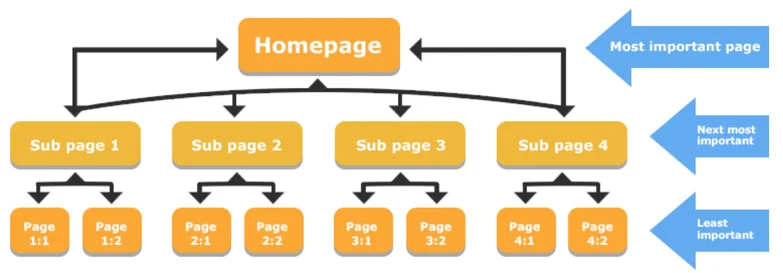
    • Use clear, logical heading structures (H1 for titles, H2/H3 for subtopics).

    • Use HTTPS with a valid SSL certificate.

    A strong website backend supports better performance on Google Maps as well.

    How Listbusinessprofile Can Help You Rank

    At Listbusinessprofile, we help small and local businesses rank better by combining the latest best practices with personalized strategy. Our services include:

    • Setting up or optimizing your Google Business Page with all necessary elements.

    • Managing reviews, questions, and photo updates to keep your profile active.

    • Running weekly Google Posts with CTA-driven promotions.

    • Optimizing your connected website with local SEO, schema markup, and fast load speeds.

    • Monitoring your performance through Google Business Profile Manager and making continuous adjustments.

    Final Thoughts: Don’t Let Your GMB Profile Cost You Customers
    google Business Page

    If you’re not ranking on Google Maps or local search results, you’re missing valuable leads every day. From outdated info to weak engagement, every issue can be solved with the right approach.

    Whether you want to fix GMB ranking fast or build a long-term local presence, our team is here to guide you.

    Want to improve your Google Business Profile ranking or Increase Google Business Page Traffic today? Let Listbusinessprofile help you turn things around.

    Contact us now and start showing up where your customers are already searching.

  • SEO, AIO, GEO, AEO: Which One Actually Gets You Traffic

    SEO, AIO, GEO, AEO: Which One Actually Gets You Traffic

    SEO-AEO-GEO-listbusinessprofile

    In 2025, simply stuffing keywords into a webpage is no longer enough to get noticed by Google. The digital marketing space has evolved rapidly, and with it, four major strategies have emerged: SEO, AIO, GEO, and AEO. Each of these plays a role in helping businesses rank, gain visibility, and attract more qualified traffic.

    But what’s the difference between them—and more importantly, which one delivers real results?

    Let’s break it all down, using real examples, engaging questions, and smart takeaways that you can implement today.

    What Is SEO in 2025 and Why It Still Matters

    SEO, or Search Engine Optimization, remains the backbone of online visibility. But in 2025, it’s more complex than ever.

    SEO now focuses on:

    • Understanding user search intent

    • Building Experience, Expertise, Authority, and Trust (E-E-A-T)

    • Speed, user experience, and Core Web Vitals

    • Using schema markup and structured data

    Example: A user searches for “best lawyer near me.” Google checks for a fast-loading site, consistent business details, solid reviews, and localized content—before showing results.

    ✅ Want to be seen? Start with a well-optimized website and Google Business profile.

    What Is AIO – AI Optimization in Real Life

    AIO (AI Optimization) is about aligning your content so that AI tools—like ChatGPT or Google Gemini—understand and elevate it.

    AIO helps content get indexed and summarized by AI properly. It includes:

    • Using clear, structured formats

    • Creating well-outlined content with AI prompts

    • Training AI models on your voice for brand consistency

    Example: A fitness coach uses AI tools to write structured workout blogs. These pieces rank higher as AI tools pull them into answers.

    Question: Are you using AI just to speed things up—or to create smarter content? 

    What Is GEO – Generative Engine Optimization

    What Is GEO – Generative Engine Optimization​

    GEO means optimizing content to appear in AI-generated search results, like Google’s SGE or Bing Chat.

    GEO involves:

    • Formatting content into Q&A or snippet-friendly style

    • Including FAQs and headings for easy parsing

    • Being concise but informative

    Example: A tax consultant writes blogs answering questions like “Can I deduct rent as a business expense?” These blogs are picked up by Google’s AI-generated snippets.

    Question: Are you writing for people, search engines—or both?

    AEO – Answer Engine Optimization in Practice

    AEO-VS-SEO

    AEO focuses on optimizing for voice search, smart assistants, and zero-click queries.

    With more users asking questions directly to their phones or smart speakers, you need:

    • Simple language and clear answers

    • FAQ pages with brief responses

    • Schema markup for voice search

    Example: A local bakery adds a Q&A page with questions like “Do you make gluten-free cakes?” The answer gets read aloud in voice searches.

    Question: Is your content mobile and voice-friendly?

    How to Optimize Your Google Business Profile in 2025

    Your Google Business Profile is a vital asset in local SEO.

    To drive leads and improve visibility:

    • Regularly post updates, promotions, and images

    • Use relevant questions and answers

    • Keep NAP details consistent

    • Encourage positive reviews

    Example: A pet groomer updates their profile weekly and answers user questions like “Do you handle large breeds?” Result: they appear first in Google’s local pack.

    Question: Are you making the most of your Google listing—or letting it go stale?

    Which Strategy Wins in 2025? SEO, AIO, GEO, or AEO?

    Each strategy has a unique role:

    • SEO: Must-have for websites and ranking on Google

    • AIO: Ideal for improving AI content visibility

    • GEO: Perfect for being featured in AI search experiences

    • AEO: Great for voice search and snippet dominance

    The best approach? Combine all four for maximum results.

    6 Ways to Combine SEO, AIO, GEO & AEO

    1. Start with SEO: Focus on clean code, fast sites, meta tags, and solid content.

    2. Add AIO: Use AI tools to brainstorm and refine—but humanize the final output.

    3. Incorporate GEO: Use subheadings, lists, and structured content.

    4. Integrate AEO: Add FAQs, speak in everyday language, and use rich snippets.

    5. Optimize Your Google Business Profile: Post weekly, respond to questions, and encourage reviews.

    6. Analyze Data: Use analytics and insights to track performance and iterate.

    “SEO in 2025 is no longer about one trick—it’s about using all tools smartly.”

    Recommended Tools for 2025 Optimization
    • Google Search Console for performance insights

    • ChatGPT / Gemini for content outlines

    • SEMrush / Ahrefs for SEO and competitor tracking

    • BrightLocal for local SEO performance

    • Google Business Manager for profile control

    Final Thoughts: Stop Guessing, Start Ranking

    Ranking in 2025 requires more than just traditional SEO. You need to be present in AI tools, answer engines, voice assistants, and generative results.

    Start with your content. Is it:

    • Clear and structured?

    • Designed for human AND AI understanding?

    • Helpful to answer questions in under 50 words?

    If not—it’s time to rethink your strategy.

    👉 At Listbusinessprofile, we help brands combine SEO, AIO, GEO, and AEO into one powerful growth system. Ready to be found everywhere your customers search?

    Let’s get you ranked through best digital marketing strategies.

  • Want to Double Your Local Leads in 30 Days? Optimize Your Google Business Page/Profile Like This

    Want to Double Your Local Leads in 30 Days? Optimize Your Google Business Page/Profile Like This

    In today’s hyper-local digital era, your Google Business Page is more than just a directory listing—it’s your gateway to local visibility, trust, and conversion. If you’re a business owner trying to generate more local leads, this guide will show you how to optimize your Google Business Profile to start attracting new customers within 30 days.

    Let’s dive in.

    Why Your Google Business Page Matters More Than Ever in 2025

    verify google business profile manager -listbusinessprofile

    With Google’s latest updates in 2025, local search has become even more sophisticated. Google favors businesses that provide accurate, updated, and engaging listings. If you want to be found by local customers—especially those searching from mobile—your Google Business Page is your first impression.

    Question: Are your potential customers finding your competitors instead of you?

    A fully optimized Google Business Profile can:

    • Improve local rankings

    • Drive more calls, visits, and leads

    • Boost trust with customer reviews and photos

    Step-by-Step Google Business Page Optimization Checklist

    1. Claim and Verify Your Business

    Claiming and verifying your listing through the Google Business Profile Manager is the first step toward full control. This helps your business appear in local search and maps reliably.

    Without verification, your listing won’t appear in local search results.

    2. Complete Every Section of Your Profile

    Make sure your business name, address, phone number, hours, website, and category are complete. Incomplete profiles are less likely to rank well.

    Add multiple categories if applicable, like “Bakery” and “Coffee Shop.”

    3. Use Targeted Local Keywords

    Incorporate local keywords naturally in your description and services. This increases your visibility in searches relevant to your area.

    This boosts both visibility and relevance in Google search.

    4. Optimize Your Business Description

    Write a compelling description in up to 750 characters, highlighting what makes your business unique. Include your services and location.

    Example: “We’re a family-run dental clinic in downtown Houston, specializing in cosmetic dentistry and emergency dental care. Book now!”

    5. Upload High-Quality Photos Regularly

    Post updated images of your premises, staff, and services to increase customer trust and engagement. Google listings with fresh photos get more clicks.

    Update visuals monthly to keep your page fresh.

    6. Enable and Respond to Reviews

    Encourage satisfied clients to leave feedback and take the time to respond to every review. This interaction builds trust and improves your online reputation.

    Example: “Thanks for your feedback, John! We’re glad you loved the new menu.”

    7. Utilize Google Posts Weekly

    Use posts to highlight promotions, events, and updates. These appear in your listing and can drive direct action from searchers.

    Tip: Use AI tools like ChatGPT to generate post content easily.

    8. Add Services and Products

    List your services and products clearly, including pricing and descriptions. Use attractive visuals to improve engagement.

    This allows Google to match your services with relevant searches.

    9. Enable Messaging and Bookings

    Turn on messaging to let users contact you instantly and link booking tools to allow fast appointment scheduling.

    Don’t miss out on hot leads that want to act now.

    10. Track Performance in the Insights Panel

    Review performance metrics such as search queries, views, and actions. Adjust your strategy based on what’s working.

    Analytics help you see what’s working and what needs improvement.

    Additional Digital Marketing Tips to Amplify Your Local SEO

    While optimizing your Google Business Page, combine it with other strategies for greater impact:

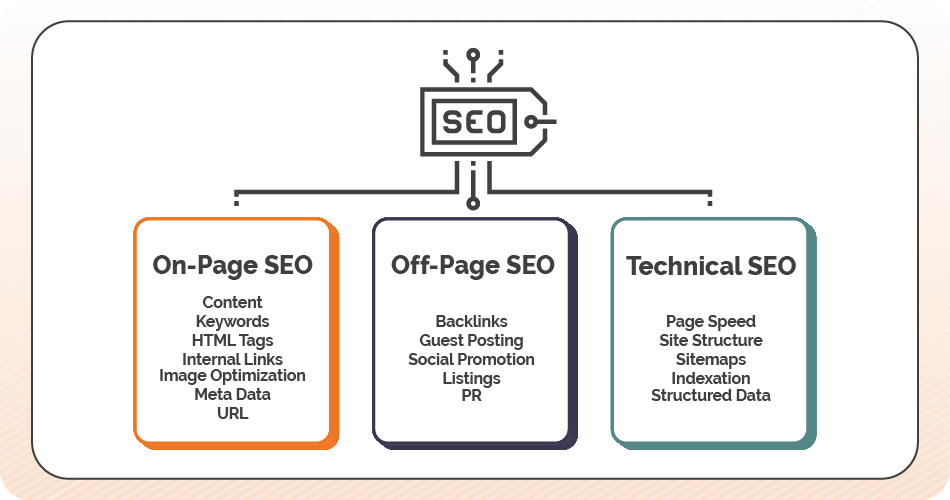
    • On-Page SEO: Optimize your site’s meta tags, headers, and content using local keywords.

    • Off-Page SEO: Get listed in local directories and build high-quality backlinks to your site.

    • Technical SEO: Ensure your website loads quickly, is mobile-friendly, and uses schema markup.

    • Social Proof: Share your GMB reviews on social media and embed them on your website.

    • Use ChatGPT: Let AI tools like ChatGPT generate blog posts, FAQs, and weekly GMB content.

    Common Mistakes to Avoid

    Avoid stuffing keywords, ignoring negative reviews, or failing to update seasonal hours. Ensure all your business information and visuals are current.

    Question: Are these mistakes quietly killing your leads?

    How This Works in the Real World

    Case Study: A plumbing business in Chicago optimized their Google Business Profile using this checklist. Within 30 days:

    • Profile impressions increased by 67%

    • Calls from GMB jumped by 42%

    • Their 4.2-star rating improved to 4.7 stars after review management

    Final Thoughts: Don’t Just List—Optimize

    Your Google Business Page isn’t just a listing—it’s your local storefront online. Optimizing it with the right keywords, engaging content, and consistent activity can double your local leads in under a month. So, if you wants to Increase Google Business Profile Traffic then follow these steps carefully.

    CTA: Need help optimizing your Google Business Profile? Reach out to Listbusinessprofile today and let us help you rank, engage, and convert.

    Bonus Checklist: 10 Quick Action Points
    1. Claim and verify your GMB listing — essential for getting listed in search.

    2. Add all business details and categories — gives customers complete info.

    3. Use local and niche keywords — increases visibility in relevant searches.

    4. Craft an engaging business description — helps you stand out.

    5. Upload high-res photos weekly — builds trust with potential customers.

    6. Respond to reviews consistently — shows that you care and improves credibility.

    7. Post weekly using Google Posts — keeps your profile active and updated.

    8. List all products/services with images — attracts more search clicks.

    9. Enable messaging and bookings — gives customers instant contact options.

    10. Monitor Insights weekly for strategy — helps fine-tune what works.

    These 10 steps can make the difference between being found and being ignored in 2025’s competitive local search landscape.

    Optimize smart. Rank fast. Get leads.

    Stay ahead with Listbusinessprofile—your go-to solution for Google Business Profile optimization, Local SEO, and digital marketing services in 2025.

  • Best Digital Marketing Strategies That Actually Work for Startups

    Best Digital Marketing Strategies That Actually Work for Startups

    What is Digital Marketing -listbusinessprofile

    In the fast-paced world of entrepreneurship, having a groundbreaking product or service isn’t enough—you also need the right digital marketing strategies to reach your target audience. For startups, the digital space is both an opportunity and a challenge. The right approach can level the playing field, allowing you to compete with big names using smart and scalable tactics.

    But what are the best strategies that truly work for startups in 2025?

    Let’s explore.

    Why Startups Need Customized Digital Marketing Strategies

    Startups often work with limited budgets, small teams, and tight timelines. That’s why using proven marketing strategies tailored to your goals and audience is crucial. Unlike established brands, startups must be nimble, creative, and highly targeted.

    Without the right digital approach, you risk getting buried under the noise of competitors and losing out on valuable visibility and conversions.

    Question: Is your marketing plan helping you grow or keeping you stuck in the startup phase?

    1. Search Engine Optimization (SEO): Your Foundation

    SEO Services -Listbusinessprofile

    SEO is the bedrock of any successful digital marketing campaign. For startups, this means creating a solid online presence that drives organic traffic consistently.

    • Use local keywords to improve Local SEO visibility.

    • Optimize your Google My Business profile.

    • Focus on content creation with long-tail keywords.

    • Build backlinks from reputable sites.

    Example: A startup home cleaning service in Austin increased leads by 40% after optimizing their Google Business Profile and local keywords.

    How Does SEO Work for Startups?

    SEO involves optimizing your website and online presence to appear higher in search engine results. It focuses on keyword research, content creation, mobile-friendliness, backlinks, and more.

    Hiring an SEO expert or digital marketing company can fast-track your success.

    2. Pay-Per-Click Advertising (PPC) and Search Engine Marketing (SEM)

    While SEO is a long-term game, Search Engine Marketing delivers faster results. Use Google Ads to bid on keywords relevant to your business.

    • Use A/B testing on ads to find the best-performing versions.

    • Target high-converting keywords.

    • Link your ads to high-quality landing pages.

    Tip: Combine PPC with SEO for a powerful one-two marketing punch.

    3. Google Business Optimization

    If you’re asking, “How do I list my business on Google?” — the answer is simple: through Google My Business.

    gmb-optimisation -listbusinessprofile
    • Keep your Google Business Profile updated.

    • Add photos, reviews, services, and FAQs.

    • Use posts to share offers and updates.

    Example: A tech startup got 200% more inquiries after optimizing their Google My Business account.

    4. Content Marketing for Authority and Trust

    Good content builds trust, authority, and SEO.

    • Start a blog sharing industry insights, tips, and case studies.

    • Create helpful guides that solve customer pain points.

    • Repurpose blog content into videos, infographics, and email content.

    Question: What problem can your content solve for your ideal customer?

    5. Email Marketing for Personalized Communication

    Email remains one of the most effective digital marketing strategies. It offers high ROI and allows you to nurture leads.

    • Segment your audience for personalized campaigns.

    • Use automation tools to schedule newsletters.

    • Include clear CTAs in every email.

    Tip: Share success stories, how-tos, and exclusive discounts to keep your audience engaged.

    6. Social Media Marketing to Build Community

    social media marketing services -listbusinessprofile

    Use platforms like Instagram, LinkedIn, and Twitter to build a loyal community.

    • Run polls, giveaways, and live sessions.

    • Partner with micro-influencers.

    • Use user-generated content to build trust.

    Example: A SaaS startup boosted sign-ups by 60% using a LinkedIn campaign and employee advocacy.

    7. Partnering with Lead Generation Companies

    Startups often lack time to do everything in-house. Working with lead generation companies can deliver pre-qualified leads quickly.

    • Make sure they understand your target audience.

    • Request reports and ROI tracking.

    Question: Are you investing your time where it matters most, or chasing leads that go nowhere?

    8. Video Marketing to Boost Engagement

    Video content is taking over. It’s engaging, memorable, and can explain complex services easily.

    • Use explainer videos on landing pages.

    • Share customer testimonials.

    • Post reels on social platforms.

    Tip: A 60-second video can do more than a 1000-word blog post when it comes to engagement.

    9. Online Reviews and Reputation Management

    Online Reputation Management -listbusinessprofile

    In 2025, reviews are digital gold.

    • Encourage happy customers to leave reviews on your Google business account.

    • Respond to all reviews—positive and negative.

    • Use reviews in your marketing content.

    Example: A fitness app startup increased conversions by 30% after highlighting positive user reviews in their ads.

    10. Marketing Analytics to Drive Data-Informed Decisions

    No strategy is complete without measuring results.

    • Use tools like Google Analytics, Search Console, and HubSpot.

    • Track conversions, traffic sources, and bounce rates.

    • Adjust your strategies based on real performance data.

    Question: Are you measuring what matters or just guessing?

    Final Thoughts: Start Strong, Scale Smarter

    Implementing the right digital marketing strategies can turn a struggling startup into a thriving business. Focus on long-term SEO marketing while leveraging quick wins from SEM and social media. Prioritize customer experience, and always test and optimize.

    Remember, the best strategy is the one tailored to your unique goals and audience.

    Want help? Partner with a reliable digital marketing company -Listbusinessprofile that knows how to list your business on Google, optimize your Google My Business profile, and turn visitors into loyal customers.

    Stay visible. Stay competitive. Start now.

  • How Local Businesses Can Save Time on GMB Management Using ChatGPT

    How Local Businesses Can Save Time on GMB Management Using ChatGPT

    In today’s fast-paced digital world, local businesses are constantly trying to stay ahead in online visibility. Managing your Google Business Profile (GBP), also known as Google My Business (GMB), is a crucial part of any local SEO and digital marketing strategy. However, maintaining it can often be time-consuming and overwhelming. That’s where ChatGPT comes into play.

    But how do you use ChatGPT to save time, increase efficiency, and grow your business locally? Let’s explore how this AI-powered tool by OpenAI is revolutionizing Google Business Profile Manager tasks for small business owners and marketers.

    Why Local Businesses Should Prioritize GMB Management

    Before diving into how to use ChatGPT, it’s important to understand why your Google My Business account matters so much. Your GMB profile is often the first point of interaction between your business and potential customers. It displays your business name, hours, photos, reviews, and location—right in Google search results and Google Maps.

    Did you know? A fully optimized Google Business Listing can increase clicks to your website by over 70%.

    That means if you’re not actively managing your GMB profile, you’re missing out on free, high-intent traffic.

    Why ChatGPT?

    ChatGPT, developed by OpenAI, is more than just a chatbot. It’s an intelligent assistant that understands natural language, automates repetitive tasks, and helps create human-like content at scale.

    So, why ChatGPT for GMB management?

    • It’s available 24/7

    • It can generate high-quality content in seconds

    • It reduces the need for hiring full-time SEO or content writers

    Question: Have you ever wished you had a virtual assistant to handle routine tasks like replying to reviews or writing weekly GMB posts?

    How Do You Use ChatGPT for GMB Management?

    Let’s break down exactly how local businesses can use ChatGPT for managing their Google Business Page:

    1. Responding to Reviews Efficiently

    Replying to customer reviews builds trust and boosts local SEO. But doing it manually takes time.

    How ChatGPT helps:

    • Generates personalized replies to both positive and negative reviews.

    • Can maintain your brand tone across all responses.

    Example Prompt:

    “Write a polite and professional response to a 5-star review for our bakery in Austin, TX.”

    2. Writing Weekly GMB Posts

    Weekly posts on your Google Business Profile keep your customers updated and improve your visibility.

    ChatGPT can:

    • Write promotional posts

    • Highlight seasonal offers

    • Share business updates or events

    Example Prompt:

    “Create a GMB post promoting 20% off on winter coats for a local clothing store.”

    3. Creating FAQ Sections

    Adding an FAQ section to your GMB or website helps with both SEO and customer service.

    How ChatGPT helps:

    • Drafts common questions customers might ask

    • Provides concise, helpful answers

    Example Prompt:

    “What are some FAQs for a local pet grooming service?”

    4. Generating Business Descriptions

    When you add business to Google, you’re asked to write a business description. This is your pitch to potential customers and Google’s algorithm.

    ChatGPT can generate:

    • SEO-friendly business overviews

    • Brand mission and vision statements

    Example Prompt:

    “Write a business description for a family-owned Italian restaurant offering dine-in and takeaway.”

    5. Creating Content Calendars

    Consistency is key in online marketing, but most local businesses don’t have a proper plan.

    Use ChatGPT to:

    • Generate monthly content calendars

    • Suggest seasonal campaign ideas

    • Provide topics for blog or social posts

    Ask Yourself: Are you posting consistently, or only when you remember?

    How AI Helps with Local SEO

    Using AI for local SEO gives you an edge over competitors who are still doing everything manually.

    ChatGPT + GMB = Local SEO Win

    • Increases frequency of optimized GMB posts

    • Helps maintain a consistent brand voice

    • Allows real-time response to customer inquiries

    • Boosts engagement and CTR on local search results

    Example: A dentist office uses ChatGPT to create weekly dental care tips and auto-replies to reviews. Within three months, they notice a 30% increase in calls and website visits.

    Did you know? Google rewards consistency and engagement on your GMB profile with better local rankings.

    ChatGPT for Digital Marketing Services

    If you’re a digital marketing company, you can also use ChatGPT to offer smarter, faster services to your clients.

    You Can Use ChatGPT To:

    • Automate GMB content creation

    • Generate keyword-rich blog posts

    • Craft tailored marketing messages

    • Streamline competitor analysis and content audits

    Question: Are your current marketing strategies AI-powered or still manual?

    Time-Saving Tips for Busy Business Owners

    Don’t have time to master SEO? Here’s how you can still win:

    • Use ChatGPT for daily task automation

    • Set up recurring GMB posts with AI prompts

    • Have your assistant or intern use ChatGPT to manage reviews

    Pro Tip: Combine ChatGPT with scheduling tools like Buffer or Publer to automate GMB and social media content.

    Common Misconceptions About ChatGPT

    Let’s address some common doubts:

    “Is ChatGPT only for techies?” Not at all. Anyone can use ChatGPT with simple prompts.

    “Will Google penalize AI-written content?” No, as long as it’s helpful, original, and human-edited, Google is fine with AI-generated content.

    “Is it safe for my business?” Yes. ChatGPT doesn’t access your private data unless you share it. Just use it responsibly.

    How to Start Using ChatGPT

    Here’s how local business owners can get started:

    1. Sign up on OpenAI’s ChatGPT

    2. Choose the free or Pro plan

    3. Start writing prompts related to your business

    4. Edit and personalize responses before posting

    Prompt Example: “Create a list of GMB post ideas for a landscaping business in Florida.”

    Final Thoughts: Smart Work Beats Hard Work

    Managing your Google Business Profile no longer needs to be a time-consuming job. With tools like ChatGPT, local businesses can stay ahead in the SEO game without burning out or breaking the bank.

    By using ChatGPT to manage your GMB reviews, posts, content calendar, and FAQs, you can:

    • Increase visibility

    • Save time

    • Improve engagement

    • Grow your business organically

    If you’ve ever asked, “How do you use ChatGPT for my business?”, now you have a complete roadmap.

    Ready to Transform Your Local SEO Strategy?

    Let Listbusinessprofile help you streamline your Google My Business tasks with AI-powered strategies.

    👉 Visit listbusinessprofile to get started with smart tools and proven digital marketing services for your local business today.