
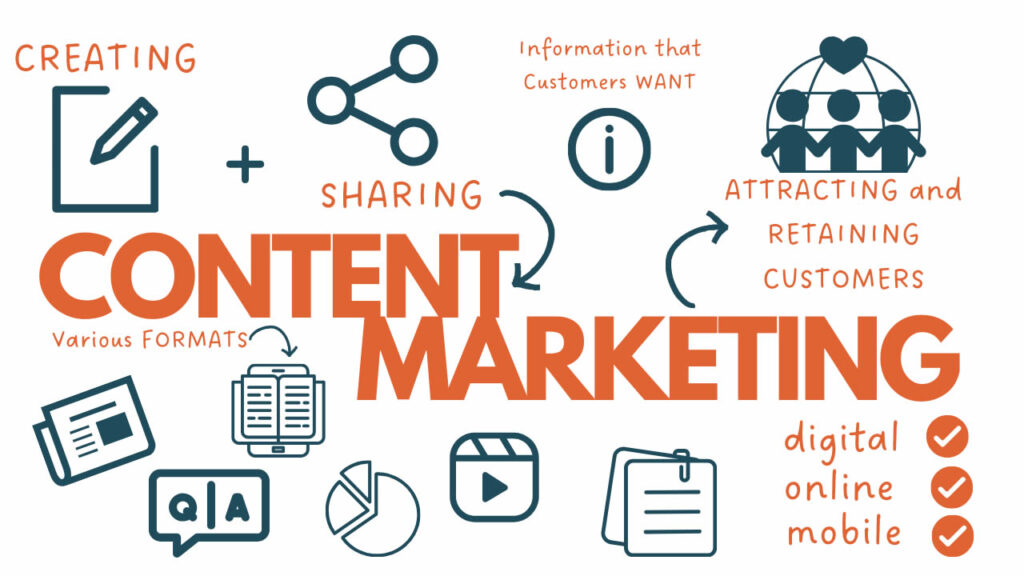
If your business is struggling to stay consistent with online content, you’re not alone. Most companies fail to publish regularly—not because they lack ideas, but because they lack a simple, repeatable system. And as a result, they lose visibility, leads, and ranking opportunities. This is one of The Real Reason 90% Businesses Collapse in Year One—they don’t have a predictable system to reach customers consistently.
So today, we’re solving that problem.
In this article, you’ll learn How to Create a 30-Day Content Calendar in 30 Minutes, even if:
You have no marketing team
Don’t know where to start
Feel overwhelmed by content planning
You struggle with consistency
We’ll also integrate proven Blog Writing Strategies, SEO tips, content research methods, and ideas that work on platforms like Medium, LinkedIn, Facebook, Instagram, YouTube, and even Google Business Profile.
Let’s start.
Why Do You Need a 30-Day Content Calendar?
Before creating one, ask yourself:
❓Why does content consistency matter for digital marketing?
❓Can content marketing help increase website traffic?
❓How can regular content improve local SEO and Google Business Profile ranking?
The answer is simple:
When you post consistently, you stay visible where your customers spend their time. Content is how you:
Improve SEO
Build authority
Increase website traffic organically
Bring customers back repeatedly
Smart brands don’t post randomly—they follow calendars.
Step 1: Define Your Big Monthly Goal
Before planning content, ask:
❓What is the primary goal of the next 30 days?
Your goal might be:
Increase website traffic
Fix Google Map ranking dropped
Improve conversions
Launch a new product
Boost Google Business Profile visibility
A single clear goal helps you plan every post with purpose.
Example goals:
Generate 200 new website visitors
Rank for “local SEO” in 30 days
Increase engagement on social posts
Convert 50 new leads
This prevents random, unplanned content.
Step 2: Choose Your Content Categories
Every 30-day content calendar must include 3–5 repeating content pillars.
Examples:
1️⃣ Educational Content
2️⃣ Awareness Content
3️⃣ SEO-Focused Articles
4️⃣ Sales-Driven Posts
5️⃣ Engagement/Community Posts
If your business focuses on digital marketing, your pillars might look like:
content marketing
local SEO
google business profile optimization
How to Increase Website Traffic Organically
How to Create Landing Pages That Actually Convert Visitors into Customers
This keeps your content balanced and strategic—not random.
Step 3: Do Keyword & Topic Research (10 Minutes)

To create content that ranks, answer the questions your audience searches on Google.
Search queries like:
Why is my Google Business Profile suspended?
My google business profile isn’t ranking How to Fix?
How can you fix your GMB ranking?
Boost organic traffic fast?
How do I create a content calendar quickly?
Use tools like:
Google autocomplete
“People Also Ask”
Google Trends
SEMrush
Ubersuggest
AnswerThePublic
Pick 30 questions, one for each day.
Step 4: Assign Each Topic to a Date
Now open a simple spreadsheet or calendar with 30 rows:
| Date | Topic | Content Type | Keyword | CTA |
|---|
Fill each day with:
1 topic
Keyword
Where it will be posted
CTA (call to action)
This creates a 30-day publishing plan without stress.
Step 5: Decide Where Every Post Will Go
You don’t need to post everywhere. Start with 2–3 platforms, such as:
Medium (blogs)
LinkedIn (authority posts)
Instagram (reels + carousels)
YouTube (shorts + explainers)
Google Business Profile (rank locally)
If ranking matters, post on:
Website blog
Medium
Google Business Profile
These help with:
SEO
Local SEO
Long-term visibility
Brand authority
Step 6: Use Blog Writing Strategies That Work
When writing long-form articles, follow proven frameworks:
✔ A strong hook
✔ Relatable problem
✔ Promise of solution
✔ Steps or explanation
✔ CTA at the end
Keep articles:
Skimmable
Keyword-optimized
Clear and actionable
Focused on problems real businesses face
This helps rank better and improve reading experience.
Step 7: Use the 10× Content Rule
Before finalizing a topic, ask:
❓Is this content better, clearer, or more useful than what already exists online?
If not, rewrite.
Google prefers:
Engagement
Depth
Expertise
Value
Real insights
And follows E-E-A-T:
Experience
Expertise
Authority
Trustworthiness
Sample 30-Day Content Calendar (Done-for-You)
Here is an example calendar based on your main keyword:
Week 1 – Content Foundations
How to Create a 30-Day Content Calendar in 30 Minutes
Why Most Businesses Fail at Content (And How to Fix It)
Top Blog Writing Strategies for Non-Writers
How to Increase Website Traffic Organically in 90 Days
Why Consistency Beats Creativity
How to Write Content Faster
Week 2 – SEO & Local SEO
What Is SEO and Why Most Small Business Websites Never Rank
My Google Business Profile Isn’t Ranking?
How Can You Fix Your GMB Ranking in 7 Days?
What To Do If Your Google Business Profile Suspended
How to Boost Organic Traffic Without Ads
What Makes Content Google-Friendly in 2025
My Google Map Ranking Dropped How to Fix?
Week 3 – Conversion & Sales
How to Create Landing Pages That Actually Convert Visitors into Customers
Why Online Leads Don’t Convert (And How to Change That)
10 Psychological Triggers That Increase Conversions
The Real Reason Website Traffic Doesn’t Turn Into Sales
How to Turn Blogs Into Leads
Content Mistakes That Cost Small Businesses Money
Why Call-To-Actions Matter More Than You Think
Week 4 – Growth & Scaling
How to Build an Audience That Trusts You
Why Engagement Matters More Than Views
How to Repurpose One Idea Into 20 Posts
Build a Full-Year Content Strategy
AI Can Improve Content Marketing?
What Makes Content Viral on Medium
Know How to Maintain Ranking Long-Term
How to Build Systems That Scale
Next 30-Day Content Challenge
Copy this into a spreadsheet, and your month is planned.
Bonus: Templates to Speed Up Content Creation
Use these plug-and-play templates:
Post Template
Headline: Problem + Promise
Introduction: Why this matters
Body: Steps or solutions
CTA: What readers should do next
Reel/TikTok/YouTube Shorts Template
Problem → Quick explanation → Step-by-step fix → CTA
Google Business Profile Post Template
Pain point → Short solution → Why it matters → CTA
Posting content here helps rank locally.
How This 30-Minute Method Helps Rank Faster
This system ensures:
Your website publishes regularly
Search engines crawl fresh content
You rank for more keywords
Your audience keeps seeing your brand
Conversion increases over time
Google gives more visibility to brands that:
Post helpful content
Prove expertise
Stay active
Solve problems
Consistency always wins.
How to Track Results
Every week, check:
Search Console stats
Google Business Profile insights
Website visitors
Blog CTR
Leads generated
Engagement metrics
This helps understand:
How content performs
What needs improvement
Can We should be doubled next month
Final Thoughts
Learning How to Create a 30-Day Content Calendar in 30 Minutes is easier than most people think. The real challenge is execution. Most businesses struggle because they don’t document a strategy and rely on inspiration instead of a system.
Once you focus on:
content marketing
digital marketing
SEO
local SEO
customer journeys
conversions
Your traffic improves, visibility improves, rankings improve—and your business begins to scale predictably.
Ready to Transform Your Content Strategy?
If you want:
A professional content calendar
A full content strategy
SEO improvements
Higher rankings
Better conversions
A complete website audit
Contact now for a FREE website audit and personalized strategy.
You’ll receive:
Website health analysis
SEO insights
Traffic growth plan
Content strategy roadmap
Let’s make your next 30 days the most productive ever.