Tag: Google business profile manager

  • How to Fix Google Maps Ranking Dropped After the 2025 Core Update

    How to Fix Google Maps Ranking Dropped After the 2025 Core Update

    How to fix Google Maps ranking dropped — this is the #1 concern for local businesses after Google’s 2025 core update. If your visibility on Maps suddenly declined, you’re not alone. This guide uncovers the reasons behind the drop and how to recover fast using smart SEO, profile optimization, and Google’s own tools.

    So, what exactly changed in Google’s update? More importantly — how can you fix your GMB ranking fast?

    Let’s break it down with clarity, examples, and proven solutions.

    🔍 What Happened in Google’s 2025 Core Update?

    Google algorithm updates 2025 -Listbusinessprofile

    The Google’s Update in early 2025 focused heavily on local relevance, trust signals, and technical SEO compliance for business listings.

    Here’s how it affected rankings:

    • Reduced visibility for incomplete or inconsistent Google Business Profiles

    • Prioritized verified businesses with updated listings

    • Penalized profiles with suspicious activity (e.g., keyword stuffing, duplicate listings)

    • Gave more weight to local engagement (reviews, directions, calls)

    📌 Example: A plumbing service in Miami with no recent reviews and outdated business hours dropped from the top 3 to page 5 on Maps.

    ⚠️ Why Did My Google Maps Ranking Drop?

    If you’ve seen a major visibility dip, here are the likely reasons:

    1. GMB Algorithm Update Penalty
      Your listing may not comply with the latest GMB algorithm update rules.

    2. Inconsistent NAP (Name, Address, Phone)
      Google prioritizes accuracy. Any inconsistency between your site, social platforms, and citations can trigger a drop.

    3. Inactive Google My Business Profile
      A profile with no posts, few reviews, or outdated photos gets de-prioritized.

    4. Suspended Google Business Profile
      If your business profile is suspended, you won’t show up at all.

    ✅ How to Fix Google Maps Ranking Dropped Issues Step-by-Step

    1. Audit and Clean Up Your Google Business Page

    Begin by logging into your Google Business Profile Manager and verify the following:

    • Business Name matches website & other platforms

    • Address is correct and verified

    • Phone number is clickable and accurate

    • Primary category is relevant (e.g., “Divorce Attorney” vs “Lawyer”)

    • Description uses relevant keywords like “Google Business Page,” “Local SEO,” and “Technical SEO.”

    💡 Also check if your Google My Business account has any alerts or suspension notices.

    Google Ranking Dropped Fixes

    2. Fix Suspended Listings or Verification Issues

    If your Google Business Profile Suspended, here’s what to do:

    • Go to the Profile Manager and check for reasons (Google now provides more clarity)

    • Submit documents like utility bills, business license, or storefront photos

    • Avoid reapplying too soon – fix all issues first

    🚫 Example issue: A business had two listings in the same city. Result? Google suspended my business account.

    3. Update My Google Business Listing with Fresh Content

    Stale listings fall in rankings.

    ✅ How to fix:

    • Post weekly updates, offers, or news

    • Add Q&A, product info, services, menus

    • Update your hours, holidays, photos regularly

    • Respond to all reviews – even the bad ones

    📈 Result: A dentist in Dallas saw a 40% traffic increase after posting weekly updates and asking patients to leave reviews.

    4. Use Long-Tail Keywords in Business Description

    Long Tail Keywords Benefits -Listbusinessprofile

    Long-tail keywords like “affordable interior designer in Houston” or “emergency electrician in Boston” work wonders in local rankings.

    💬 Inject these into your:

    • Business description

    • Posts

    • Service areas

    • Q&A section

    🛠 Tools to help: Google Keyword Planner, Ubersuggest, and ChatGPT for SEO content ideas.

    5. Rebuild Citations and Local Backlinks

    If your local search ranking fix is overdue, check your citations.

    • Are your listings on Yelp, Justdial, Bing, Facebook, etc. consistent?

    • Use tools like BrightLocal or Whitespark to scan NAP consistency

    • Build local backlinks from blogs, directories, forums

    💡 Example: KnowYourRights.com saw a bounce back in 3 weeks after cleaning up 15 broken citations and gaining 5 local backlinks.

    6. Improve Technical SEO on Your Website

    It’s not just about your GMB.

    Google evaluates your website for:

    • Core Web Vitals

    • Mobile friendliness

    • Local structured data (Schema Markup)

    • Internal linking

    • Fast load speed

    📊 Result: Novakid.com improved GMB visibility by 60% after a Technical SEO overhaul including schema, speed, and mobile fixes.

    7. Encourage Genuine Customer Engagement

    Google watches for interaction signals:

    • Review frequency and diversity

    • Driving direction requests

    • Call clicks and website visits

    📈 Encourage reviews with QR cards, email follow-ups, and incentives. More positive reviews = higher Google Business Profile ranking.

    8. Monitor GMB Insights Weekly

    Use Google’s in-built analytics:

    • Where customers are finding you

    • How many requested directions, called, or visited website

    • What search terms triggered your listing

    Use this to update your SEO strategy monthly.

    📋 Pro Tips: How Can You Fix Your GMB Ranking Fast?

    • Add local schema markup on your site

    • Target service + city keywords in content

    • Run local Google Ads to supplement traffic temporarily

    • Use ChatGPT to rewrite weak listings into keyword-rich posts

    • Always follow Google Business Update announcements on Search Central Blog

    🛠 Common Google My Business Problems & Fixes
    google business profile 2025 -listbusinessprofile

    Issues

    Quick Fixes

    • Business profile suspended
    • My Google My Business account is suspended
    • Incomplete profile
    • No engagement
    • NAP inconsistency
    • Submit reinstatement with documents
    • Fix violations and reverify
    • Add hours, services, reviews, photos
    • Start posting weekly and ask for reviews
    • Audit all citations across the web

    🧠 Still Thinking — “Why Did My Google Maps Ranking Drop?”

    Ask yourself:

    • Is your profile updated regularly?

    • Do you have recent reviews?

    • Is your site optimized with Technical SEO and Local SEO best practices?

    • Have you claimed and verified your Google Business Page fully?

    If any of those are a “no” — that’s your starting point.

    💡 Final Thoughts: Recovering from Google’s Update Takes Strategy

    It’s not about shortcuts anymore.

    To fix a Google Maps ranking dropped, you need a full-spectrum local SEO approach — one that includes:

    • GMB optimization

    • On-site SEO

    • Content and engagement strategy

    • Ongoing audits and fixes

    When done right, you’ll not only recover but Increase Your Website Traffic like never before.

    📞 Want Hands-On Help Fixing Your Google Business Rankings?

    Let us do the heavy lifting.

    We help businesses fix suspended Google Business Profiles, boost Google Business Page visibility, and unlock traffic growth through Local SEO and Technical SEO according to Google’s Latest Algorithm Updates.

    👉 Just grab your phone and feel free to reach (91)-888-710-4912 and book your Free Consultation.
  • Why Your Google Business Profile Isn’t Ranking on Google Maps — And How to Fix It Fast

    Why Your Google Business Profile Isn’t Ranking on Google Maps — And How to Fix It Fast

    Google Business Profile Ranking Fixes -Listbusinessprofile

    If you’re wondering why your Google Business Profile ranking is slipping or why you’re not showing up on Google Maps, you’re not alone. In 2025, the competition for local visibility has skyrocketed. Whether you’re a local shop owner, service provider, or digital marketer, understanding why your business isn’t ranking and how to fix it can be the game-changer for lead generation and revenue.

    So, what are the reasons behind poor rankings on Google Maps, and more importantly, how can you fix your GMB ranking fast?

    Let’s dive into the most common issues and proven strategies to increase Google Business Profile traffic today.

    What Is Google Business Profile Ranking and Why It Matters in 2025

    google my business optimization

    Google Business Profile Ranking refers to how high your business appears in local search results, especially the Google Maps 3-pack. It plays a crucial role in determining how many potential customers see and click on your listing.

    88% of consumers who do a local search visit or call a business within 24 hours. If you’re not ranking, you’re invisible.

    Why Your Google Business Profile Isn’t Ranking

    Your business might be missing out on traffic for several reasons. Here are the most common problems:

    Your Business Profile Isn’t Fully Optimized Many businesses leave their profiles incomplete. Missing business hours, categories, or service areas can reduce your visibility.

    Inconsistent NAP (Name, Address, Phone Number) If your contact details vary across platforms like Yelp, Bing, and Yellow Pages, Google sees your listing as unreliable.

    You Have Few or Poor Reviews Low review counts or negative ratings tell Google that your business may not be trustworthy or relevant.

    Lack of Engagement on Your Google Business Page An inactive profile appears neglected. Businesses that post updates and respond to reviews tend to perform better.

    Weak Website SEO Even your connected website impacts your local ranking. Slow load speed, broken links, or no local content can harm your GMB visibility.

    You Haven’t Verified Your Profile Unverified profiles don’t rank. If your business isn’t verified via postcard, phone, or email, you’re missing a critical step.

    Spammy Practices or Suspensions Violating Google’s guidelines by keyword stuffing your business name or creating multiple listings can lead to penalties or suspension.

    How to Fix GMB Ranking Issues — Step by Step

    GBP Not Ranking -Listbusinessprofile

    Fixing your Google Business Profile ranking isn’t about hacks — it’s about following proven, white-hat strategies:

    Optimize Your Business Information

    Ensure every section of your profile is filled out with accurate and keyword-rich content. Use the right primary and secondary business categories, write an engaging business description, and upload quality images to establish trust with potential customers and Google.

    Keep Your NAP Consistent Across the Web

    Your Name, Address, and Phone Number must match exactly across all online directories and citations. Tools like Moz Local or BrightLocal help you manage and correct inconsistencies that could affect trustworthiness.

    Get More Customer Reviews — And Respond to Them

    Actively request reviews from satisfied customers and respond to each one. Engagement demonstrates reliability to Google and boosts user confidence. Thanking users or addressing concerns promptly makes your business more credible.

    Post Regularly on Your Profile

    Weekly updates, promotions, or service highlights on your Google Business Page show activity and relevance. Each post should include a call to action (CTA) like “Book Now” or “Call Today” to drive interaction.

    Add Local SEO Elements to Your Website

    Ensure your website contains location-specific keywords, internal links to service areas, and embedded Google Maps. Also, implement structured data (schema) for enhanced indexing and visibility.

    Use the Google Business Profile Manager

    Leverage the insights and analytics from the profile manager to monitor traffic, actions, and customer behavior. Adjust strategies based on what’s working and what’s not.

    Build Local Backlinks

    Reach out to local blogs, news outlets, or business directories for backlinks. Local citations and backlinks improve both your domain authority and local search rankings.

    Real-World Example: Local Spa Owner in Chicago

    A Chicago-based spa was buried under competitors until they made a few key changes. First, they rewrote their business description using targeted Local SEO keywords that matched their top services. They also posted weekly skincare tips, limited-time offers, and promotions to engage their audience. Every review—positive or negative—was responded to promptly, and they personally asked 20 loyal clients for new feedback.

    Result: Within four weeks, their Google Business Profile moved from page 3 to appearing in the local 3-pack, resulting in a noticeable spike in appointment bookings and calls.

    SEO Trends 2025 and Google’s Update Impact

    Google’s latest algorithm updates focus heavily on providing accurate, helpful, and mobile-friendly results. Here’s what matters most in 2025:

    User Intent: Google rewards listings that clearly answer user queries. Ensure your business description and services are aligned with what people are actually searching for.

    Engagement Signals: Google notices when users click, call, review, or engage with your profile. More engagement means better rankings.

    Mobile-First Indexing: Since most users search via smartphones, your website and business profile must be fully responsive and quick to load.

    Why Technical SEO Still Matters

    Even if your focus is on local SEO, your website remains a foundational element of your online presence. Google evaluates site speed, structure, and security as ranking factors. Here’s what to prioritize:

    • Ensure pages load in under 3 seconds.

    • Make your site fully mobile responsive.

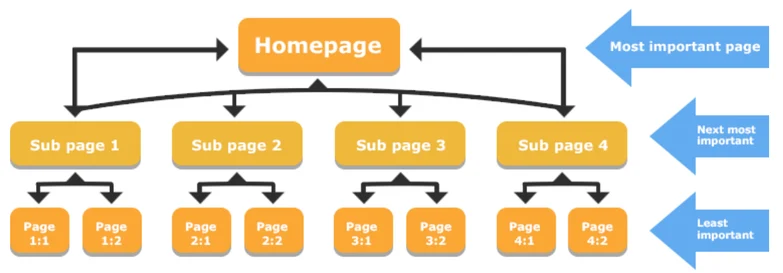
    • Use clear, logical heading structures (H1 for titles, H2/H3 for subtopics).

    • Use HTTPS with a valid SSL certificate.

    A strong website backend supports better performance on Google Maps as well.

    How Listbusinessprofile Can Help You Rank

    At Listbusinessprofile, we help small and local businesses rank better by combining the latest best practices with personalized strategy. Our services include:

    • Setting up or optimizing your Google Business Page with all necessary elements.

    • Managing reviews, questions, and photo updates to keep your profile active.

    • Running weekly Google Posts with CTA-driven promotions.

    • Optimizing your connected website with local SEO, schema markup, and fast load speeds.

    • Monitoring your performance through Google Business Profile Manager and making continuous adjustments.

    Final Thoughts: Don’t Let Your GMB Profile Cost You Customers
    google Business Page

    If you’re not ranking on Google Maps or local search results, you’re missing valuable leads every day. From outdated info to weak engagement, every issue can be solved with the right approach.

    Whether you want to fix GMB ranking fast or build a long-term local presence, our team is here to guide you.

    Want to improve your Google Business Profile ranking or Increase Google Business Page Traffic today? Let Listbusinessprofile help you turn things around.

    Contact us now and start showing up where your customers are already searching.

  • Want to Double Your Local Leads in 30 Days? Optimize Your Google Business Page/Profile Like This

    Want to Double Your Local Leads in 30 Days? Optimize Your Google Business Page/Profile Like This

    In today’s hyper-local digital era, your Google Business Page is more than just a directory listing—it’s your gateway to local visibility, trust, and conversion. If you’re a business owner trying to generate more local leads, this guide will show you how to optimize your Google Business Profile to start attracting new customers within 30 days.

    Let’s dive in.

    Why Your Google Business Page Matters More Than Ever in 2025

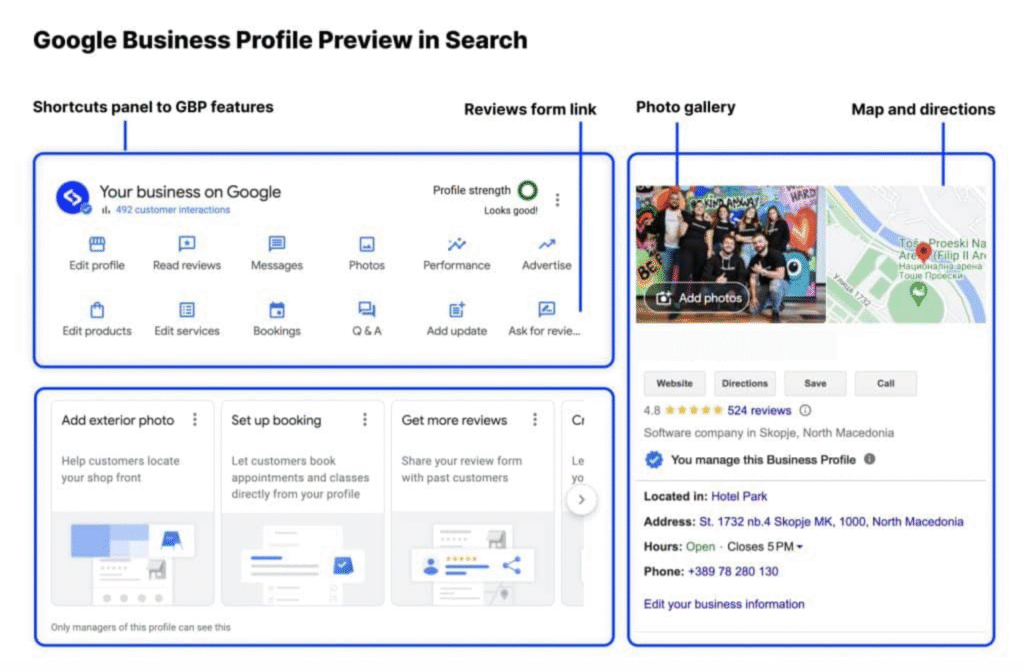
    verify google business profile manager -listbusinessprofile

    With Google’s latest updates in 2025, local search has become even more sophisticated. Google favors businesses that provide accurate, updated, and engaging listings. If you want to be found by local customers—especially those searching from mobile—your Google Business Page is your first impression.

    Question: Are your potential customers finding your competitors instead of you?

    A fully optimized Google Business Profile can:

    • Improve local rankings

    • Drive more calls, visits, and leads

    • Boost trust with customer reviews and photos

    Step-by-Step Google Business Page Optimization Checklist

    1. Claim and Verify Your Business

    Claiming and verifying your listing through the Google Business Profile Manager is the first step toward full control. This helps your business appear in local search and maps reliably.

    Without verification, your listing won’t appear in local search results.

    2. Complete Every Section of Your Profile

    Make sure your business name, address, phone number, hours, website, and category are complete. Incomplete profiles are less likely to rank well.

    Add multiple categories if applicable, like “Bakery” and “Coffee Shop.”

    3. Use Targeted Local Keywords

    Incorporate local keywords naturally in your description and services. This increases your visibility in searches relevant to your area.

    This boosts both visibility and relevance in Google search.

    4. Optimize Your Business Description

    Write a compelling description in up to 750 characters, highlighting what makes your business unique. Include your services and location.

    Example: “We’re a family-run dental clinic in downtown Houston, specializing in cosmetic dentistry and emergency dental care. Book now!”

    5. Upload High-Quality Photos Regularly

    Post updated images of your premises, staff, and services to increase customer trust and engagement. Google listings with fresh photos get more clicks.

    Update visuals monthly to keep your page fresh.

    6. Enable and Respond to Reviews

    Encourage satisfied clients to leave feedback and take the time to respond to every review. This interaction builds trust and improves your online reputation.

    Example: “Thanks for your feedback, John! We’re glad you loved the new menu.”

    7. Utilize Google Posts Weekly

    Use posts to highlight promotions, events, and updates. These appear in your listing and can drive direct action from searchers.

    Tip: Use AI tools like ChatGPT to generate post content easily.

    8. Add Services and Products

    List your services and products clearly, including pricing and descriptions. Use attractive visuals to improve engagement.

    This allows Google to match your services with relevant searches.

    9. Enable Messaging and Bookings

    Turn on messaging to let users contact you instantly and link booking tools to allow fast appointment scheduling.

    Don’t miss out on hot leads that want to act now.

    10. Track Performance in the Insights Panel

    Review performance metrics such as search queries, views, and actions. Adjust your strategy based on what’s working.

    Analytics help you see what’s working and what needs improvement.

    Additional Digital Marketing Tips to Amplify Your Local SEO

    While optimizing your Google Business Page, combine it with other strategies for greater impact:

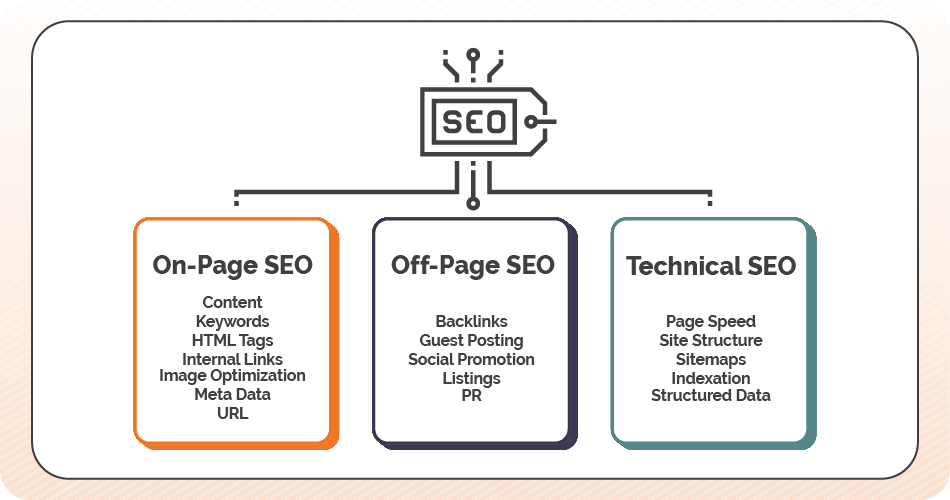
    • On-Page SEO: Optimize your site’s meta tags, headers, and content using local keywords.

    • Off-Page SEO: Get listed in local directories and build high-quality backlinks to your site.

    • Technical SEO: Ensure your website loads quickly, is mobile-friendly, and uses schema markup.

    • Social Proof: Share your GMB reviews on social media and embed them on your website.

    • Use ChatGPT: Let AI tools like ChatGPT generate blog posts, FAQs, and weekly GMB content.

    Common Mistakes to Avoid

    Avoid stuffing keywords, ignoring negative reviews, or failing to update seasonal hours. Ensure all your business information and visuals are current.

    Question: Are these mistakes quietly killing your leads?

    How This Works in the Real World

    Case Study: A plumbing business in Chicago optimized their Google Business Profile using this checklist. Within 30 days:

    • Profile impressions increased by 67%

    • Calls from GMB jumped by 42%

    • Their 4.2-star rating improved to 4.7 stars after review management

    Final Thoughts: Don’t Just List—Optimize

    Your Google Business Page isn’t just a listing—it’s your local storefront online. Optimizing it with the right keywords, engaging content, and consistent activity can double your local leads in under a month. So, if you wants to Increase Google Business Profile Traffic then follow these steps carefully.

    CTA: Need help optimizing your Google Business Profile? Reach out to Listbusinessprofile today and let us help you rank, engage, and convert.

    Bonus Checklist: 10 Quick Action Points
    1. Claim and verify your GMB listing — essential for getting listed in search.

    2. Add all business details and categories — gives customers complete info.

    3. Use local and niche keywords — increases visibility in relevant searches.

    4. Craft an engaging business description — helps you stand out.

    5. Upload high-res photos weekly — builds trust with potential customers.

    6. Respond to reviews consistently — shows that you care and improves credibility.

    7. Post weekly using Google Posts — keeps your profile active and updated.

    8. List all products/services with images — attracts more search clicks.

    9. Enable messaging and bookings — gives customers instant contact options.

    10. Monitor Insights weekly for strategy — helps fine-tune what works.

    These 10 steps can make the difference between being found and being ignored in 2025’s competitive local search landscape.

    Optimize smart. Rank fast. Get leads.

    Stay ahead with Listbusinessprofile—your go-to solution for Google Business Profile optimization, Local SEO, and digital marketing services in 2025.

  • What ChatGPT Told Me About Earning $1000 Online — and What Actually Works

    What ChatGPT Told Me About Earning $1000 Online — and What Actually Works

    In today’s fast-moving digital world, people are obsessed with finding smart and scalable ways to make money online. Whether it’s affiliate marketing, digital products, or freelance services, there’s no shortage of strategies. But what happens when you turn to AI—specifically ChatGPT—to ask for help?

    At Listbusinessprofile, we put it to the test. We asked, “How can I earn $1000 online?” and ChatGPT gave us answers that were both smart and unintentionally hilarious. What followed was a blend of surprising insight, comedic suggestions, and real opportunities to build online income using the power of AI.

    How to Use ChatGPT? Listbusinessprofile

    Why Ask ChatGPT How to Earn $1000 Online?

    ChatGPT is more than a chatbot—it’s a brainstorming tool, writing assistant, market analyst, and productivity booster rolled into one. But can it really help you make money?

    Question for Readers: Have you ever used AI tools like ChatGPT to get business or income ideas? If not, what’s holding you back?

    ChatGPT’s Funniest Yet Smartest Ideas to Earn $1000 Online

    Let’s take a closer look at what ChatGPT suggested, where it missed the mark, and how you can turn those ideas into realistic income streams.

    1. Start a Blog and Monetize It

    ChatGPT’s Suggestion:

    “Pick a niche, start a blog, use affiliate marketing and ad networks to generate income.”

    Reality Check: It’s solid advice—but the competition is fierce, and success takes consistent SEO and content strategy.

    What Works:

    • Focus on micro-niches like “Google My Business SEO for plumbers” or “How to list your business on Google maps.”

    • Optimize using long-tail keywords: _”how to list my business on Google for free,” “SEO for local businesses in 2025,” “optimize Google Business Profile.”

    • Use tools like Ahrefs and Google Search Console to find trending content gaps.

    Example: A blog about optimizing your Google Business Profile manager to increase walk-in traffic for local stores.

    Question: Would you consider starting a blog this weekend if AI could help write your posts?

    2. Freelance Services Using ChatGPT

    ChatGPT’s Suggestion:

    “Use Fiverr or Upwork to sell services like graphic design, writing, or SEO.”

    Funny Part: ChatGPT suggested “drawing dinosaurs in tuxedos” as a niche. Surprisingly, some people do that.

    What Works in Reality:

    • Use ChatGPT to offer services like:

      • Writing SEO-friendly blog posts

      • Local SEO reports

      • Profile setup for Google My Business accounts

    • Offer bundled services like: “I’ll list your business on Google + optimize your profile + create 5 review response templates.”

    Pro Tip: Create a Fiverr gig using the keyword “Using ChatGPT for content creation.”

    3. Build Local Lead Generation Websites

    Strategy from ChatGPT:

    “Create niche websites for local businesses and monetize with ads.”

    Actual Profitable Version:

    • Build city-based micro-sites targeting service niches: plumbers, roofers, gyms, etc.

    • Rank using keywords like “add business to Google,” “Local SEO services in [city],” or “best digital marketing agency near me.”

    • Sell leads to local businesses or monetize through affiliate partnerships.

    Example: A site like bestroofersinmumbai.com with top listings and GMB links.

    4. Create and Sell Digital Products

    ChatGPT’s Suggestion:

    “Design templates or tools and sell them online.”

    What Works:

    • Use ChatGPT + Canva to create:

      • GMB optimization checklists

      • SEO service pricing guides

      • Content calendars for local businesses

    Sell On: Gumroad, Etsy, Payhip

    Long-Tail Keywords to Use:

    • “Downloadable tools for Google My Business”

    • “Templates for local SEO agencies”

    • “Canva templates for business listings”

    Question: Have you ever thought of selling a simple checklist online? You might be one download away from your first $100!

    Bonus: Combining AI Tools for a $1000 Strategy

    Use multiple tools to streamline effort and scale results:

                          Tool                                      Use

                    ChatGPT                              Content writing, email templates, keyword ideas

                       Canva                                Design lead magnets, ebooks, ads

                      Pictory                               Turn articles into video content

                     TidyCal                               Schedule discovery calls

    Strategy:

    1. Write a blog on “How to rank your business on Google in 2025” using ChatGPT.

    2. Create an infographic in Canva.

    3. Repurpose it into a video using Pictory.

    4. Share across LinkedIn, YouTube, Medium, and your website.

    5. Add affiliate links, monetize traffic.

    The Unexpected Humor of ChatGPT

    Here are some of the funniest suggestions ChatGPT gave:

    • “Offer a psychic reading service… for pets.”

    • “Sell ASMR recordings of you reading Google reviews.”

    Crazy? Yes. Impossible? Maybe not.

    But behind the absurdity are reminders to niche down, stand out, and entertain your audience.

    Optimize for Google — Not Just Giggles

    To rank this content on Google, we made sure to:

    • Use active voice for readability

    • Add ChatGPT and Digital Marketing long-tail keywords

    • Include internal references to:

      • Google My Business

      • Google Business Profile Manager

      • List My Business on Google

      • SEO Services

      • Local SEO

    • Keep paragraphs short, clear, and engaging

    • Insert questions to invite reflection and keep bounce rate low

    Final Thoughts: Can You Really Earn $1000 Online with ChatGPT?

    Absolutely—but only if you use it strategically.

    ChatGPT is a powerful tool to support:

    • Content creation

    • Business idea generation

    • Lead magnet development

    • Social media content plans

    • Local SEO audits

    It’s not about AI replacing work—it’s about AI enabling smarter, faster, scalable work.

    Whether you’re trying to add your business to Google, need digital marketing for local clients, or want to launch a passive income side hustle, ChatGPT can be the fuel behind your efforts.

    We help businesses grow smarter using the latest tools in AI, SEO, and Digital Marketing. Learn how to optimize your Google Business Profile, improve your online visibility, and make your brand stand out.

    👉 Ready to build your business and earn online? Visit Listbusinessprofile and explore our Local SEO and Google Listing Services today!